
Optional employee text notifications
SMS enrollment evidence
PEZPD, LLC DBA Waltz Brewing
Operator of the Waltz Brewing SHART staff-text program
Updated October 16, 2026
PEZPD, LLC, doing business as Waltz Brewing, uses SHART for staff schedules, shift reminders and operational team updates. Waltz Brewing is the public-facing name of PEZPD, LLC and appears in the interface and message examples below. Enrollment takes place inside each employee's authorized account, followed by a text from their own saved mobile number. This public page documents that process for registration review; it does not collect phone numbers or subscribe anyone.
1. The employee chooses texts
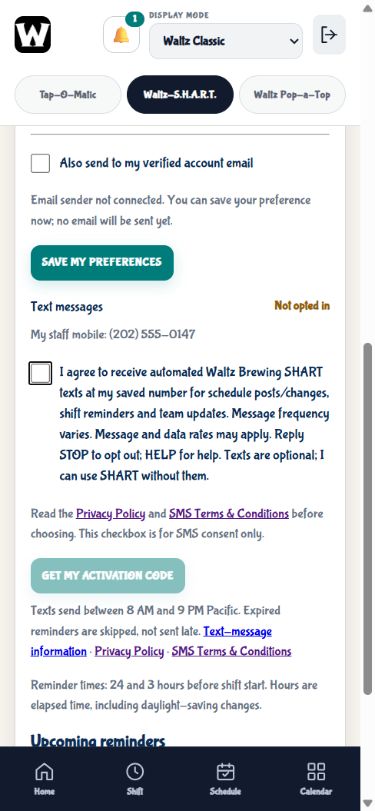
A manager may save a staff contact number and link it to the employee's account. Neither that action nor signing in subscribes the employee. The employee opens Notifications → My preferences → Text messages, sees their own saved mobile and reviews a separate SMS consent checkbox. It starts unchecked; the activation-code button stays disabled until the employee checks it. SHART remains usable without SMS.
I agree to receive automated Waltz Brewing SHART texts at my saved number for schedule posts/changes, shift reminders and team updates. Message frequency varies. Message and data rates may apply. Reply STOP to opt out; HELP for help. Texts are optional; I can use SHART without them.
The Privacy Policy and SMS Terms & Conditions are linked immediately beside the consent controls. The number shown below, (202) 555-0147, is fictional; it is not a staff contact or the sending number.
2. The employee requests a personal code
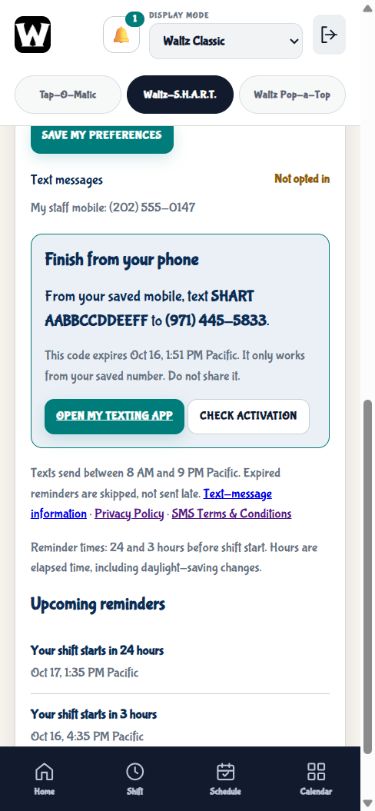
After checking the disclosure and choosing Get my activation code, the employee sees instructions to text SHART followed by their personal 12-character activation code to the Waltz SHART program number, (971) 445-5833. The code expires after 15 minutes and works only from the saved mobile associated with that account. A manager cannot activate another employee's subscription.
The base keyword is SHART, but plain SHART is not enough. Each employee must use their own current code; they must not use the sample code shown here. The saved number is managed in staff records rather than collected on this public page.
3. Illustrative activation exchange
Example only—not a live SMS conversation. This describes the implemented verification and confirmation behavior once the registered sender, signed webhook and service connection are configured and tested. That live setup is still pending.
Employee → (971) 445-5833
Sent from their own saved mobile, using their own current code:
SHART → employee, only after validation
The current confirmation reply for a valid number and code is:
SHART validates the sending number and code before enabling that account. Expired, unknown or wrong-number codes do not enroll anyone. The reply above is shown for review, not evidence that a message was delivered. Sender registration, service connection, an approved owner-controlled test and delivery activation are separate steps.
Stopping texts and getting help
Reply STOP to stop routine program texts, or use Turn off my texts inside SHART. Reply HELP for help. After an opt-out, START removes the carrier messaging block but does not itself enroll the account; a fresh SHART activation is required. A saved-number change also requires fresh verification and consent.
For staff support, contact a Waltz manager or (503) 536-7693 (text/voicemail). This support contact is separate from the program's sending number.